Essential Website Design Inspiration Resources to Fast-Track Your Business Website
Why Design Inspiration Resources Matter for Australian Businesses
Launching a professional, high-converting website for your business or startup in 2026 doesn't have to mean months of design work from a blank canvas. By tapping into high-quality design inspiration resources and template libraries, Australian business owners can dramatically reduce time to market while still achieving a polished, conversion-focused result.
The key is choosing resources that prioritise real-world performance over flashy, award-chasing visuals. You want examples and templates that:
- Showcase live, functioning websites
- Follow modern UX and conversion best practices
- Are actually usable and adaptable for your business
Below are five standout platforms that deliver exactly that - practical inspiration, proven patterns, and ready-to-use starting points tailored to busy founders, marketers, and in-house teams.

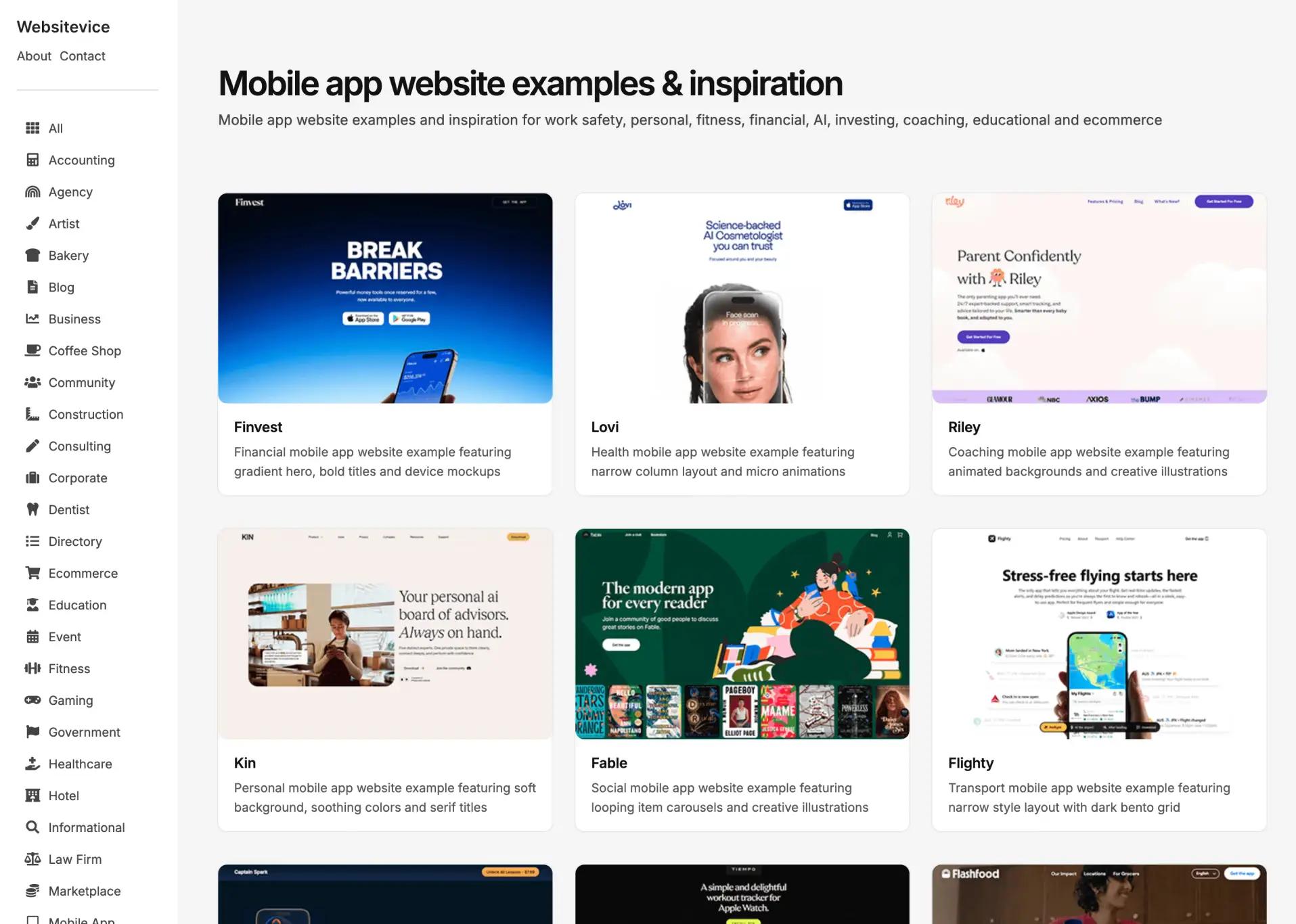
Curated gallery of results-focused web design examples for Australian business owners and startups
1. Websitevice
4,500+ Results-Focused Website Design Examples
Websitevice is a large, results-driven website gallery built specifically for makers, founders, and business owners who care about conversions and performance - not just visual flair.
Why it’s valuable:
- 4,500+ live website examples across SaaS, eCommerce, agencies, startups, and professional services
- Conversion-first curation that highlights clear user journeys, strong value propositions, and effective CTAs
- Robust filtering by industry and site type so you can quickly find examples relevant to your niche
- Regular updates so you’re always seeing current, working patterns
For Australian businesses planning a new site or redesign, Websitevice is ideal for:
- Understanding how successful companies in your space structure their sites
- Identifying layout and navigation patterns that support lead generation and sales
- Creating a visual brief for your web design or web development team
Use it to build a shortlist of 5 to 10 reference sites that demonstrate the structure, clarity, and conversion focus you want to emulate.
Visit Websitevice

A library of free, responsive HTML and CSS website templates for cost-effective web development in Australia
2. HTMLrev
2,000+ Free HTML/CSS Templates Ready to Deploy
HTMLrev is a massive library of free, production-ready HTML/CSS templates that can dramatically cut down build time - especially if you’re working with a developer or comfortable editing code.
Key advantages:
- 2,000+ free templates covering full websites, landing pages, blogs, portfolios, eCommerce, and dashboards
- Responsive, modern layouts that adapt to mobile, tablet, and desktop
- Clean, well-structured code that’s straightforward to customise for branding, content, and layout tweaks
- Commercial-friendly licensing on most templates, often without attribution requirements
- Ongoing additions that keep the library aligned with current design trends
For startups and small businesses on tight budgets or timelines, HTMLrev lets you:
- Start from a near-finished layout instead of a blank file
- Launch MVP sites and landing pages quickly
- Provide your developer with a concrete base, reducing billable hours
Research from publications like Smashing Magazine suggests that using template frameworks can reduce development time by 40–60% compared to building from scratch - making HTMLrev a strong option for cost-conscious Australian businesses.
Visit HTMLrev

Mobile-responsive Elementor template kits for WordPress redesigns and rapid website launches
3. GuyWP
Unlimited Free Elementor Template Kits for WordPress
If your site runs on WordPress (as more than 40% of the web does), GuyWP offers a powerful shortcut: complete Elementor template kits you can import and customise visually - no coding required.
What makes it stand out:
- Unlimited free Elementor kits that cover entire websites, not just single pages
- Mobile-first, fully responsive designs, ideal for Australian audiences where mobile traffic often exceeds 60%
- Direct WordPress integration so you can import kits or individual pages and edit them with Elementor’s drag-and-drop builder
- Professional-grade layouts built with UX, UI, and conversion best practices in mind
- Diverse categories including agencies, consultants, restaurants, eCommerce, portfolios, SaaS, and more
- Mix-and-match flexibility to combine sections and pages from different kits into a unique design
GuyWP is especially useful if you:
- Want to redesign an existing WordPress site without a full custom build
- Need to launch quickly but still want control over layout and content
- Prefer a visual editing experience over working directly with code
Pairing GuyWP with a strategic web design partner can give you the speed of templates plus the polish and performance of professional optimisation.

SaaS landing page inspiration showing high-converting user interface (UI) and user experience (UX) design patterns
4. SaaS Landing Page
890+ Proven SaaS Landing Page Examples
For software, SaaS, and digital product businesses, generic inspiration galleries often fall short. SaaS Landing Page solves this by focusing purely on high-performing SaaS landing pages.
Why SaaS teams love it:
- 890+ curated SaaS landing pages from successful software companies
- Examples from top-tier and emerging brands, showing what works at different stages of growth
- Conversion-focused breakdowns of hero sections, CTAs, value propositions, and user flows (on many entries)
- Filtering by key elements like pricing layouts, feature sections, testimonials, and more
- Current, active examples that reflect modern SaaS design and messaging patterns
This resource is particularly valuable for Australian tech startups and software companies that need to:
- Clarify how to present complex features in a simple, compelling way
- Decide how to structure pricing pages and free trial offers
- Learn how leading SaaS brands use social proof, FAQs, and objection handling
Use it alongside your UX design process to map out:
- Above-the-fold messaging and primary CTA
- Information hierarchy for features and benefits
- Supporting sections that reduce friction and increase signups

Minimalist website design examples focusing on clean typography and premium UI for professional service firms
5. Minimal Gallery
Beautiful, Functional Website Design Curation
Minimal Gallery is a tightly curated collection of minimalist websites that prove you don’t have to choose between beauty and usability.
What you’ll find:
- Highly selective curation focused on designs that balance aesthetics with clarity and function
- Minimalist, modern layouts that use whitespace, strong typography, and focused content
- Examples that prioritise function over visual gimmicks, aligning naturally with conversion goals
- A wide range of industries, showing how minimalism can work for B2B, professional services, creative brands, and more
- Thoughtful commentary on what makes each design effective, helping you understand principles rather than just copying visuals
For Australian businesses wanting a timeless, premium look, Minimal Gallery is ideal for:
- Defining a clean, professional aesthetic that won’t date quickly
- Reducing visual noise so your key messages and CTAs stand out
- Inspiring designs that feel high-end without being overcomplicated
Minimalist design often pairs well with premium positioning, professional services, and brands targeting discerning audiences.
How to Use These Resources Effectively
1. Start with Industry-Specific Research
Begin with Websitevice and, if you’re in software, SaaS Landing Page. Look for:
- Navigation patterns
- How value propositions are framed
- Placement and style of CTAs
- How pricing, features, and social proof are presented
Capture screenshots and notes to build a clear picture of what “good” looks like in your space.
2. Decide on Your Build Approach
Choose whether you’ll:
- Start from templates (HTMLrev or GuyWP) for speed and cost-efficiency, or
- Go fully custom, using the galleries as directional inspiration
Templates are ideal for MVPs, smaller budgets, and faster launches. Custom design is better when differentiation and complex functionality are priorities.
3. Create a Mood Board
Pull together 5–10 examples from Websitevice, Minimal Gallery, and SaaS Landing Page (if relevant) that align with your brand and goals. Include notes on:
- Layout and structure
- Colour and typography
- Tone of imagery and content
Share this with your design and development team before any build work begins.
4. Prioritise Conversion Elements
As you review examples and templates, pay special attention to:
- Hero sections and above-the-fold messaging
- Primary and secondary CTAs
- Trust signals (testimonials, reviews, client logos, certifications)
- Pricing tables and offer framing
- Forms and lead capture flows
These elements have the biggest impact on leads and sales.
5. Validate Everything on Mobile
Always test:
- Navigation and menu behaviour
- Readability of headings and body copy
- Button size and tap targets
- Form usability on smaller screens
Given the high share of mobile traffic in Australia, mobile performance is non-negotiable.
6. Work with Professionals for Best Results
While these resources make DIY more achievable, partnering with experienced web design and web development specialists ensures your site:
- Loads quickly and is technically sound
- Is optimised for SEO and Core Web Vitals
- Converts effectively across devices and traffic sources
- Can scale and evolve with your business
The Bottom Line: Inspiration Accelerates Success
High-quality design inspiration doesn’t just save time - it improves outcomes. By studying proven patterns and leveraging ready-made templates, you can:
- Launch faster with confidence in proven design patterns
- Avoid costly mistakes by learning from successful examples
- Stay current with evolving design trends and user expectations
- Build more effective websites that convert visitors into customers
Whether you're planning a complete redesign or just need a fresh perspective, these five resources give you instant access to thousands of real-world examples and battle-tested templates.
Ready to Turn Inspiration Into Reality?
Browsing design galleries is a great start, but bringing your vision to life takes expertise. At Ziff Digital, we combine creative design with strategic thinking to build websites that don't just look good - they drive measurable business results.
Thanks for reading - from the results-driven team at Ziff