Wireframing and Prototyping Explained — What They Are and Why Your Project Needs Both?
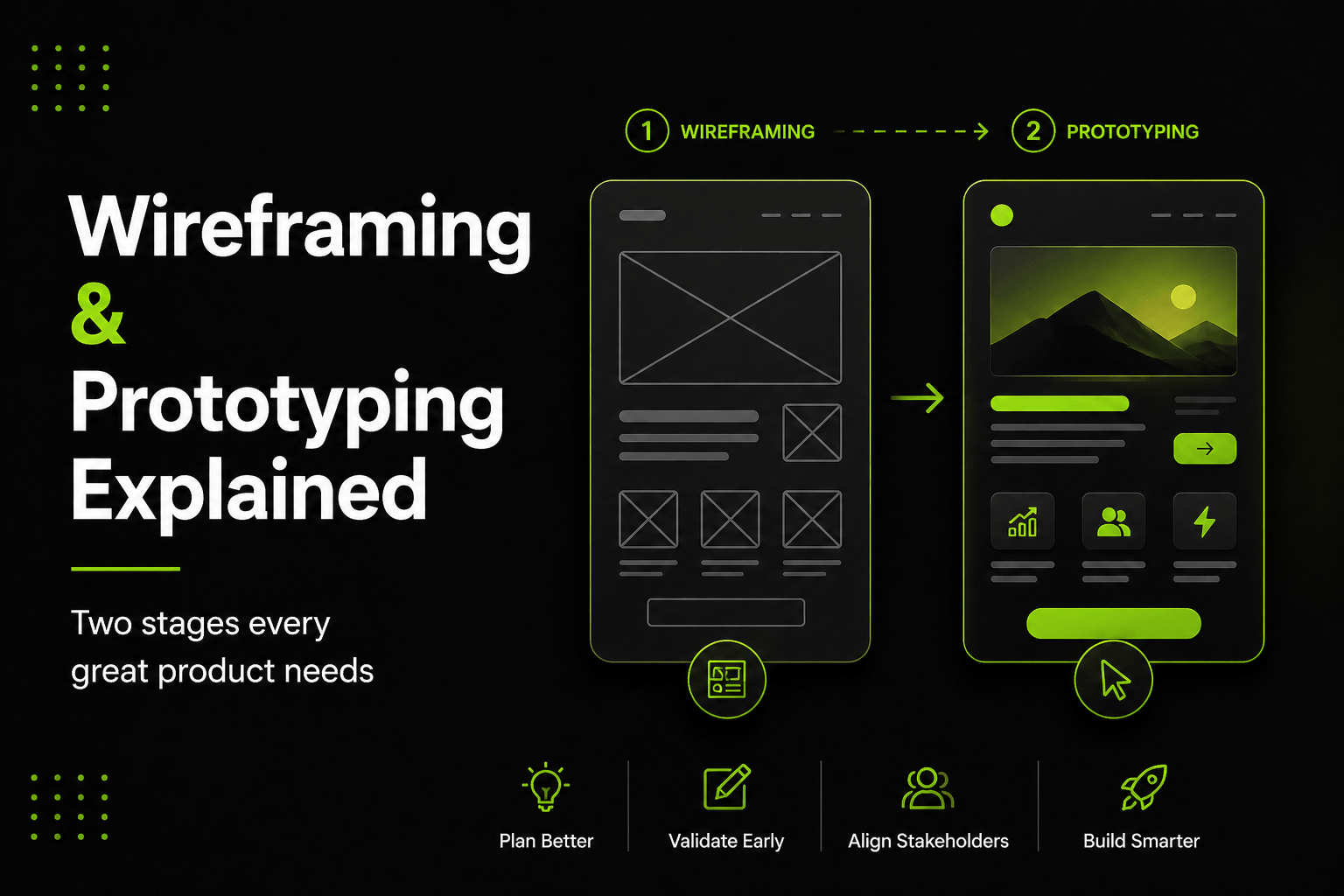
Two of the most important stages in any UX design project are wireframing and prototyping. Many businesses either skip them to save time or confuse them with each other. Both decisions are expensive.
Wireframes and prototypes are not the same thing. They serve different purposes at different points in the design process. Together, they are what separate a UX process that produces reliable results from one that produces beautiful screens that do not actually work for users.
What Is a Wireframe?
A wireframe is a simple, low-detail layout that shows the structure of a screen or page. Think of it as the blueprint for a building before the walls go up. It shows where things will be placed — the navigation, content areas, buttons, forms — without colour, typography or visual design applied.
Wireframes are not meant to be beautiful. They are meant to be clear. The purpose is to define structure and hierarchy before anyone invests time in visual design. This matters because changing a wireframe takes hours. Changing a finished design takes days. Changing a built product takes weeks.
For businesses commissioning a website or app, wireframes are the stage where you confirm the structure makes sense before moving forward. If the navigation is wrong, a key call to action is buried, or a user journey requires too many steps — a wireframe shows all of this early when changes are fast and cheap. This is especially true for UX design for startups and early-stage products, where changes are cheap and building the wrong thing is the biggest risk.
What Is a Prototype?
A prototype is an interactive simulation of your product. Where a wireframe is a static picture of layout, a prototype is clickable and navigable. You can move through it the way a real user would — clicking buttons, filling forms, moving between screens.
Prototypes come in two main levels. A low-fidelity prototype links wireframes together so you can test the flow. A high-fidelity prototype looks and feels almost exactly like the finished product — with real visual design, micro-interactions and transitions applied.
The critical difference between a wireframe and a prototype is that prototypes allow you to test the experience with real users. You can watch people interact with your product before a single line of code exists — and see exactly where they get confused, what they expect where they cannot find it, and what makes them confident or frustrated.
Why You Need Both?
Wireframes and prototypes serve different purposes. Skipping wireframes and jumping straight to a prototype means building an interactive version of a structure that has not been properly thought through. Skipping prototypes and going from wireframes to development means building a finished product without testing whether the experience actually works.
The two work in sequence. Wireframes get the structure right. Prototypes validate that the experience works. Together they are the foundation of a UX process that produces good outcomes consistently rather than by chance.
For any website or app project, both stages pay for themselves. Changes at the wireframe stage cost hours. Changes at the prototype stage cost days. Changes after development costs weeks — sometimes months.
The Wireframing Process
Wireframing typically begins after a discovery and research phase where user needs, business goals and technical requirements have been established. The designer creates low-fidelity layouts of all key screens — not every possible state, but the core flows most users will experience.
These wireframes are reviewed collaboratively. Stakeholders review the structure, feedback is incorporated, and layouts are revised until the structure is agreed. Only then does visual design begin.
Good wireframes answer these questions clearly:
- What is the most important element on this screen and where does it sit?
- What is the user trying to do here and is the path to doing it obvious?
- What content is present and how is it prioritised visually?
- What actions are available and are they easy to find without scrolling?
The Prototyping Process
Once wireframes are approved and visual design is applied, prototyping adds interactivity. This can be done at low fidelity early — linking wireframes to test the flow — or at high fidelity later, when visual design is complete and you want to test the full experience.
High-fidelity prototypes are built in tools like Figma, Adobe XD or Framer. They include real text, real images, real interactions and transitions. From a user's perspective, using a high-fidelity prototype feels almost identical to using the real product.
This is precisely what makes them so valuable. You can run usability testing sessions with real users before anything is built. You can find and fix problems in the prototype rather than the code. And you can demonstrate the intended experience to stakeholders and developers in a way that a static wireframe can never match. If you are not sure what to look for in a design partner, read our guide on how to hire a UI UX designer who runs this process properly.
Usability Testing — Closing the Loop
Wireframing and prototyping only realise their full value when combined with usability testing. This means watching real people try to complete real tasks in your product — and learning from what they struggle with.
You do not need a large sample. Even five to eight participants will surface the majority of significant usability issues. The goal is identifying the patterns of confusion that your internal team — who know the product too well — will never spot on their own.
Testing a prototype before development is one of the highest-value activities in any UX process. It turns assumptions into evidence. It replaces debate with data. And it dramatically reduces the risk of building something that does not work for the people it was built for. The insights from usability testing feed directly into how UX design improves conversion rates on your live product.
How Wireframing and Prototyping Affect the Final Product?
The quality of wireframing and prototyping at the early stage has a direct and lasting impact on the quality of the finished product. Products built on well-tested, well-structured wireframes and prototypes are faster to develop, cheaper to maintain and easier for users to navigate. The development team knows exactly what to build. There are fewer surprises. And when the product launches, it works the way users expect.
Good UX design also affects your website's performance in search results. Pages that users engage with — staying longer, bouncing less, completing actions — send positive signals to Google. The result is a product that performs better both commercially and in search rankings.
What to Expect From a Professional UX Design Process?
If you are planning a new website, a product redesign or a mobile app, wireframing and prototyping are not optional extras. They are the stages that determine the quality of everything that follows. Skipping them to save time or budget almost always costs more in the end.
Work with a UI UX design agency Australia that treats these stages as foundational. Ask to see examples of their wireframing and prototyping work. Ask how they conduct usability testing and what they do with the findings. Those answers will tell you whether they have a genuine UX process or just a visual design process — and that distinction matters more than any portfolio image.
Frequently Asked Questions
Q1. What is the difference between a wireframe and a prototype?
A wireframe is a static layout that shows the structure of a screen without colour or visual design. A prototype is an interactive, clickable simulation of the product that users can navigate. Wireframes define structure; prototypes test the experience. Both are essential stages in a professional UX design process.
Q2. Do I need wireframes if I have a design brief?
Yes. A design brief describes what you want. A wireframe shows how it will be structured on screen before visual design begins. Without wireframes, visual designers are making structural decisions and design decisions simultaneously — which leads to more revisions and slower delivery. Wireframes separate structure from aesthetics and make both easier to get right.
Q3. What tools are used for wireframing and prototyping?
The most widely used tools are Figma, Adobe XD and Sketch for both wireframing and prototyping. Figma is currently the industry standard because it supports real-time collaboration, works in-browser without installation, and allows both wireframes and high-fidelity interactive prototypes in a single tool.
Q4. How many users do you need for usability testing on a prototype?
Research consistently shows that five to eight participants are enough to surface the majority of significant usability issues. You do not need a large sample for prototype testing. The goal is identifying patterns of confusion — not statistical significance. Running two rounds of five users, with design improvements between rounds, is a highly effective and affordable approach.
Q5. Does wireframing and prototyping add a lot of time to a project?
Done properly, wireframing and prototyping saves net time by reducing rework after development. The typical wireframing and prototyping phase for a medium-complexity project adds two to four weeks to a project timeline — but it usually removes six to twelve weeks of post-launch fixes and revisions. The investment pays for itself many times over.